TL;DR:
- An automated shipping confirmation workflow reduces support costs and increases customer trust.
- Branded tracking and personalized communication enhance the customer experience and loyalty.
- Proactive updates, especially during delays, ensure satisfied customers and reduce uncertainty.
A customer places an international order, pays, and waits. Then: nothing. Or a generic email from a carrier they don’t know. For small and medium-sized e-commerce businesses, this scenario is painfully familiar. An unclear or late shipping confirmation raises doubts, increases support inquiries, and directly damages customer trust. proactive and branded communication significantly boosts customer confidence. In this article, you’ll learn how to set up a smart shipping confirmation workflow that reassures your customers, reduces your support burden, and supports your international growth.
Key Insights
Point | Details |
|---|---|
Automate confirmations | Automatic shipping confirmations save time and reduce customer inquiries. |
Use branded tracking | A branded tracking page increases trust and customer satisfaction. |
Communicate proactively during exceptions | Inform customers immediately about delays or issues to prevent unnecessary support requests. |
Integrate the right tools | Choose systems that easily connect to your webshop for a streamlined workflow. |
why a streamlined shipping confirmation workflow is essential
After introducing the problem, we explore why a smarter workflow is essential. The consequences of poor shipping confirmation are greater than you think.
A late or unclear confirmation triggers a chain reaction. Your customer sends an email. Your support team responds. Time is lost, and the customer is already dissatisfied before the package arrives. This repeats dozens of times per week if you don’t have an automated workflow.
Proactive communication breaks this cycle. When customers receive automatic updates at the right time, they ask fewer questions. They know where their package is, when it will arrive, and what to do if there’s an issue. This results in direct time savings during delivery for both parties.
An important distinction is between branded tracking and generic carrier tracking. Branded tracking works better than generic carrier pages to build trust. A customer landing on an unfamiliar carrier tracking page feels uncertain. A customer seeing a tracking page with your logo, your colors, and your communication style feels supported by you.
The impact on your business is measurable:
- NPS increases when customers feel proactively informed
- The number of returns decreases with clear communication about delivery times
- Support costs drop due to fewer incoming order status inquiries
- Customer loyalty grows as the brand experience remains consistent
“The shipping confirmation isn’t a side note. It’s one of the few direct touchpoints after purchase. It helps set the tone for the entire customer relationship.”
For international shipments, this is especially critical. A package traveling from the Netherlands to Canada goes through multiple logistics steps. With well-designed tracking systems, you keep customers informed at every stage, even if delays occur.
requirements and tools for automating shipping confirmations
Now that you understand why it’s important, here’s what you need to start automating. The good news: you need less than you might think.
The foundation consists of three data sources you already have: order data, customer data, and the tracking link generated by your carrier. When you combine these in an automated flow, you have the core of a working shipping confirmation workflow.
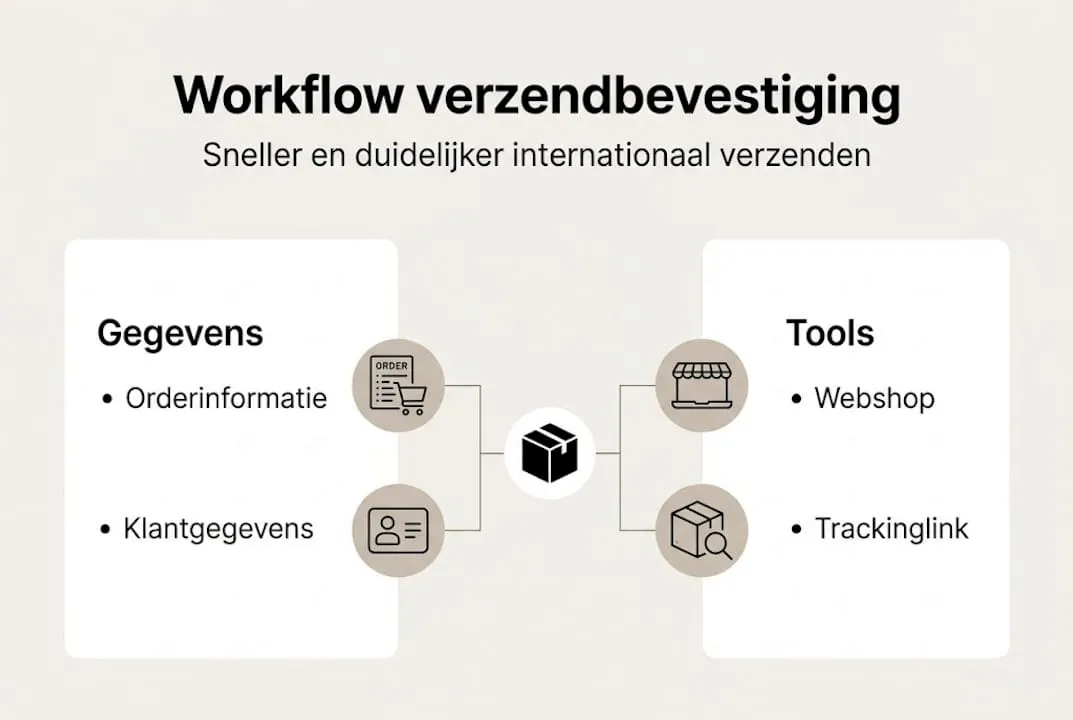
Component | Tool or source | function in the workflow |
|---|---|---|
order data | e-commerce platform | trigger for automation |
customer data | CRM or email platform | personalization of messages |
tracking link | carrier or API | real-time status updates |
email tool | e.g., Klaviyo, Mailchimp | sending messages |
SMS platform | e.g., MessageBird | urgent notifications |
Integrations with Shopify and WooCommerce make automation easily accessible for smaller webshops. You don’t need to be a developer to set up these connections.
When choosing your toolstack, consider these criteria:
- API availability: can the tool connect with your carrier?
- Templates: are ready-made email templates available?
- Multi-language support: essential if you sell in multiple countries
- SMS integration: useful for urgent updates or 'out for delivery' notifications
For international shipments, optimizing international shipping is indispensable. The tools you choose must handle the complexity of customs processes, time zones, and multiple carriers.

Pro tip: Start with one platform and one email template. Test it thoroughly on a small group of orders before expanding to SMS and more complex logic. A working basic flow is more valuable than a perfect but delayed setup.
If you’re focusing on smart e-commerce shipping, it’s wise to first select your most common destinations and activate the workflow for those first.
step-by-step guide: how to automate the shipping confirmation process
With the right tools in place, here’s the concrete step-by-step guide to full automation. These are the five steps you’ll follow.
- gather all relevant customer and order data: ensure your system has access to name, email address, order number, delivery address, and chosen carrier. These are the building blocks of every personalized confirmation.
- configure automated triggers: set up an email to be sent when the shipment status changes. The most common triggers are: shipment registered, shipment in transit, shipment delivered.
- create personalized confirmation emails: Use the customer's name, order number, and expected delivery time. A template with dynamic fields works excellently here. Generic messages like 'your package is on the way' lack impact.
- add branded tracking: Don’t redirect customers to the carrier’s tracking page; instead, direct them to a page that displays your branding. This keeps the customer experience consistent and strengthens trust.
- integrate exception notifications: Proactive communication about exceptions is more effective than reactive support. If a package is delayed or stuck in customs, inform the customer before they call you.
approach | reactive | proactive (automated) |
|---|---|---|
inform customer | after customer contact | automatically upon status change |
support burden | high | low |
customer experience | frustrated | reassured |
costs | high | structurally lower |
To prevent shipment delays , step 5 is the most valuable. Most companies intentionally or unintentionally skip this step, even though this is where the biggest differences in customer satisfaction arise.
Pro tip: Link exception notifications to a specific tone of voice. For a delay, you want to be empathetic, not formal. 'We see that your package will arrive later than planned. We’ll keep you updated.' works better than a dry status update. It’s also smart to use common mistakes in international shipping as inspiration when drafting your exception messages.
common mistakes and optimizations in shipping confirmation workflows
Now that the process is in place, let’s look at common mistakes and advanced opportunities. Because a workflow that works technically isn’t always one that makes customers happy.
Too little personalization is the most common mistake. A confirmation with only the order number and a generic link feels no different from spam. Your customer bought from you, not a logistics provider. The communication should reflect that.
Not using branded tracking is the second big missed opportunity. If a customer lands on a generic DHL or PostNL page, your brand disappears at the moment when attention is highest. This is a waste.
- mistake 1: not using branded tracking
- mistake 2: too little personalization in email texts
- mistake 3: no SMS for urgent statuses
- mistake 4: reactive instead of proactive for delays
- mistake 5: skipping workflow testing
SMS is effective for shipments that require immediate action, such as an 'out for delivery' notification. Email is fine for confirmations, but for time-sensitive messages, you want to reach your customer faster. An SMS like 'your package will be delivered today between 2:00 PM and 4:00 PM' prevents missed deliveries and frustration.
“Customers don’t expect perfection. They expect transparency. An honest delay with an explanation is better than silence.”
Optimizations you can apply immediately:
- A/B test your subject lines in confirmation emails
- use emojis for recognition in busy inboxes
- add a return link in the confirmation, not just when there’s a problem
- monitor open rates per country to see which communication style works
For those already advanced: Look at insights from e-commerce shipping tips and link them to data from your tracking systems to see where customers feel the most uncertainty.
our take: what’s overlooked when automating shipping confirmations
Automation isn’t neutral. A technically flawless automated workflow that communicates in a flat, emotionless way misses the point entirely. We see this time and again with companies that think 'going live' with a flow is enough.
What companies consistently overlook are the small but meaningful moments in the customer journey. The moment a package crosses the border. The moment customs clearance is completed. These are moments when a customer thinks about their order, and a relevant notification creates a positive memory instead of concern.
We always advise our clients to consider the emotion behind each trigger. A customer who ordered an expensive product experiences more tension than someone who bought a book. That context should come through in your communication style.
Review practical optimization tips as a starting point, but go a step further: Ask yourself with every notification whether the customer will feel reassured or uncertain afterward. That question is the key to a workflow that truly makes a difference.
start shipping internationally more efficiently today
A smart shipping confirmation workflow starts with the right logistics foundation. If you ship international packages flawlessly with the correct tracking data, you provide your automation tools with the information they need.
Parcel International has been working since 2007 with e-commerce companies that ship internationally to over 220 countries and territories. Whether you want to start with automated workflows or improve your existing process: The power lies in a reliable shipping partner as your foundation. And if you want to understand which factors cause delays, read more about the causes-of-delays. Schedule a conversation today and discover how to get started more efficiently.
Can't find your question? Our support team is here for you 24/7 via the help centre.
What is a shipping confirmation workflow exactly?
A shipping confirmation workflow is the automated process that proactively notifies your customer immediately after shipment, providing updates and tracking information. This enhances the customer experience, as shipping confirmations and tracking are essential in every post-purchase customer journey.
What are the benefits of automating shipping confirmations?
This prevents unnecessary customer inquiries, increases trust, and directly reduces support costs. Proactive communication demonstrably saves time and costs in customer service.
Which tools are suitable for shipping confirmation workflows?
Popular systems include Shopify and WooCommerce due to their broad integration capabilities. These integrations make automation easily accessible for smaller e-commerce stores without requiring technical expertise.
Why is branded tracking more important than a generic tracking screen?
Branded tracking provides a trusted customer journey, reducing the likelihood that customers will seek support. It enhances trust by maintaining a consistent brand experience after purchase.
Get a grip on your parcel shipping
Compare carriers, choose the best price and keep track of your international shipments. You can calculate and book without an account.