
Unknown Recipient
The Unknown Recipient form is used to report shipments that were delivered to someone other than the intended receiver.
Submitting complete and accurate information helps speed up the carrier investigation and claim resolution process.
Open the Unknown Recipient page from the left-side menu or directly at transportal.parcelinternational.com/form/unknownreceiver
Step 1: Review claim submission guidelines
- Before creating a claim, review the required submission rules and timelines carefully.
Submission Time Limit
- Claims must be submitted within 7 days after the shipment delivery date.
- Claims submitted after this period may be considered invalid by the carrier.
Processing Time
- Carrier investigations for unknown recipient claims typically take approximately 30 days.
Final Outcome Notification
- You will receive updates once the carrier completes the investigation and provides a final decision.
Step 2: Create a new unknown recipient claim
- Follow the steps below to start a new shipment investigation request.
Open the Claim Form
- Click the + Add button located at the top-right corner of the dashboard.
Complete the Required Information
- Fill in all required shipment and claimant details accurately.
Upload Supporting Documents
- Upload all required supporting documents before submitting the claim.
Submit the Claim
- After verifying all information, submit the claim for carrier investigation.
Step 3: Enter the Airwaybill Number
- Enter the Airwaybill Number related to the shipment.
- The Airwaybill Number is the unique shipment tracking identifier used by the carrier to investigate the shipment.
Step 4: Upload the unknown recipient statement
- A completed and signed Unknown Recipient statement must be uploaded with the claim.
Download the Statement Template
- Click the Download button to download the required Unknown Recipient statement template.
Complete and Sign the Statement
- Fill in the required information and sign the document before uploading.
Upload the Statement
- Click Choose File and upload the completed statement document.
Step 5: Upload the commercial invoice
- Upload the shipment Commercial Invoice, if available and applicable to the shipment.
- Commercial invoices may be required for shipment verification and carrier investigation processing, depending on the shipment type and destination (e.g., international shipments).
Step 6: Enter financial details
- Enter the required bank and payment details accurately.
Required Financial Information
- Provide the following details:
- Bank Account Number (IBAN)
- Account Holder Name
- Ensure all entered information is correct before submitting the form.
Step 7: Select shipment insurance status
- Indicate whether shipment insurance was enabled for the shipment.
Insurance Options
- Select one of the following options:
- Yes
- No
Step 8: Submit the unknown recipient claim
- Before submitting the claim:
- Review all entered shipment details
- Verify uploaded documents
- Confirm financial information
- After submission, the claim will be forwarded for carrier investigation.
Step 9: Monitor claim status
- After submitting the claim, you can monitor the investigation progress directly from the dashboard.
- The dashboard provides visibility into the latest updates and claim processing stages.
Step 10: Review claim details from the dashboard
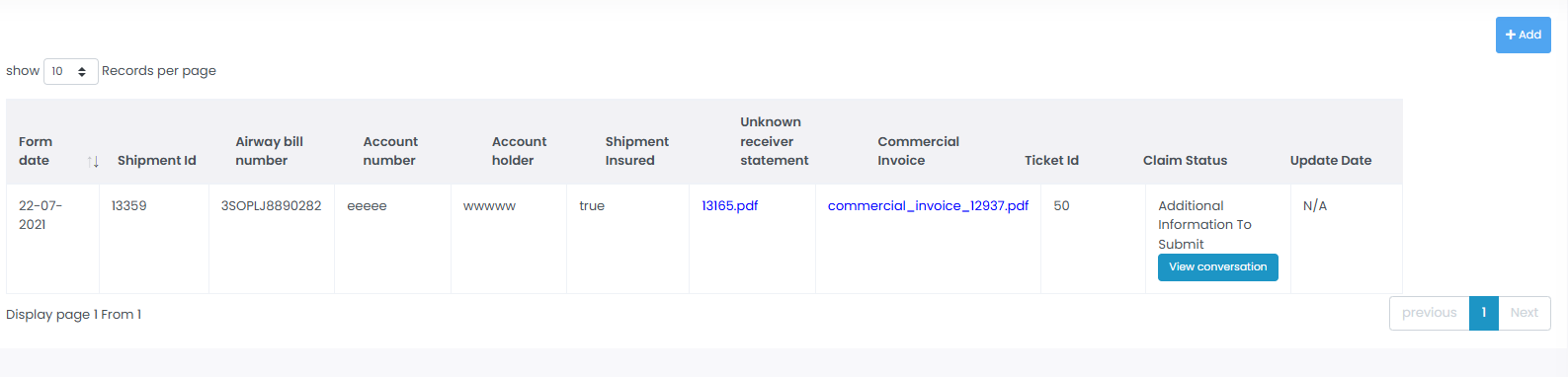
- The dashboard displays detailed information for all submitted unknown recipient claims.
Form Date & Update Date
- Displays:
- Claim submission date
- Latest investigation update date
Uploaded Documents
- Provides direct access to uploaded documents including:
- Unknown Recipient Statement
- Commercial Invoice
Tracking Information
- Displays important shipment references including:
- Shipment ID
- Airwaybill Number
- Internal Ticket ID
Claim Status
- Displays the current investigation status.
- Common statuses may include:
- Pending
- Under Investigation
- Resolved
- Rejected
Tips & Tricks
- Submit Claims Quickly
- Submit claims immediately after identifying delivery issues to improve investigation speed.
- Verify Tracking Information
- Double-check Airwaybill Numbers and shipment references before submission.
- Upload Clear Documents
- Ensure uploaded statements and invoices are:
- Clear
- Readable
- Fully completed
- Properly signed
- Keep Copies of All Documents
- Save copies of uploaded documents for future reference and audit purposes.
- Monitor Claim Updates Regularly
- Review the dashboard frequently for:
- Carrier responses
- Additional document requests
- Final investigation results
- Use Accurate Financial Information
- Incorrect IBAN or account holder details may delay claim reimbursements or settlements.
This guide is about the customer portal. No account yet? Create one for free.
Still stuck?
Our support team is here for you 24/7.