
Tracer Package
The Tracer Package section allows you to report delayed or missing shipments and track the investigation process with the carrier.
Submitting accurate shipment and package information helps speed up the investigation and improve the chances of shipment recovery.
For lost shipments confirmed by the carrier or damaged shipments, please use the relevant Lost or Damage claim sections.
Tracer requests should be submitted within 10 days of the expected delivery date whenever possible.
Open the Tracer Package page from the left-side menu or directly at transportal.parcelinternational.com/form/tracer
Step 1: Review tracer package requests
- The tracer request table displays all submitted shipment investigation requests.
- Use this section to monitor ongoing investigations and claim progress.
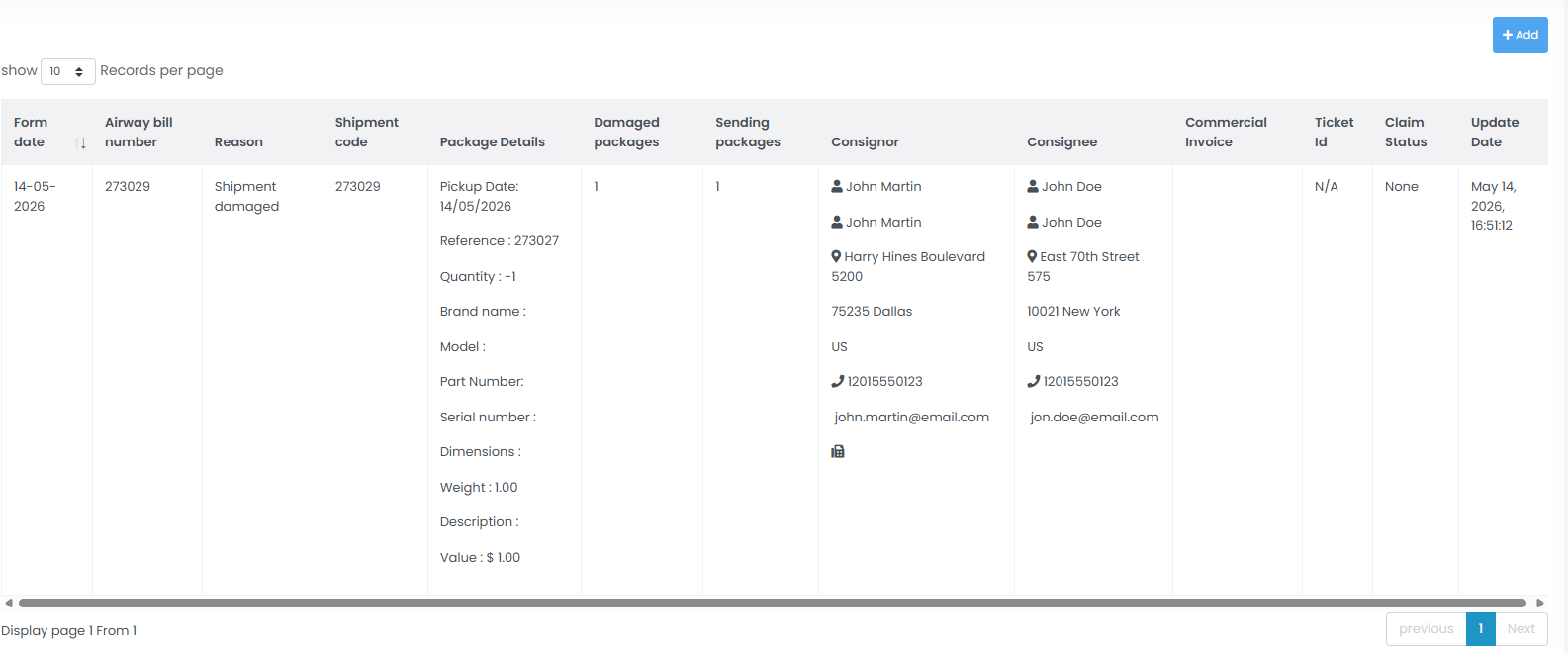
Step 2: Understand tracer request details
The tracer request table contains important shipment investigation information.
Form Date & Update Date
- Displays when the tracer request was created.
- Shows the latest update date for the investigation.
Airway Bill Number & Shipment Code
- Unique shipment identifiers used to track the parcel with the carrier.
- These references help carriers locate shipment details during the investigation.
Reason
- Displays the issue type reported for the shipment.
- Example reasons may include:
- Shipment damaged
- Shipment lost
- Shipment delayed
- Missing items
Package Details
- Displays technical shipment information including:
- Pickup date
- Reference number
- Item quantity
- Brand or model
- Serial numbers
- Shipment weight
- Declared shipment value
Consignor & Consignee
- Displays sender and receiver details including:
- Contact names
- Addresses
- Phone numbers
- Shipment contact information
Commercial Invoice
- Upload commercial invoice document, if available.
- Commercial invoices may be required for claim validation and carrier investigations, depending on the shipment type and destination (e.g., international shipments).
Ticket ID & Claim Status
- Displays the internal support ticket reference.
- Shows the current claim or investigation status.
- Common statuses may include:
- None
- Pending
- Processing
- Resolved
Step 3: Create a new tracer request
- Click the + Add button located at the top-right corner of the page.
- Complete the tracer request form with accurate shipment details.
- Provide all required shipment and package information to improve investigation accuracy.
Tips & Tricks
- Submit tracer requests as soon as possible after identifying shipment issues.
- Having the serial number and commercial invoice ready before creating the tracer request can significantly speed up claim handling.
- Always verify shipment references and tracking numbers before submitting requests.
- Include accurate package details and declared values to improve carrier investigation results.
- Keep copies of commercial invoices and shipment documentation for future reference.
- Regularly review tracer request statuses for investigation updates and carrier responses.
This guide is about the customer portal. No account yet? Create one for free.
Still stuck?
Our support team is here for you 24/7.