
Disputes
The Disputes page provides a centralized dashboard for tracking and managing invoice disputes, shipment billing disagreements, and reimbursement requests.
This section allows you to monitor the progress of submitted claims and review all dispute-related communication in one place.
Open the Disputes from the left-side menu or directly at transportal.parcelinternational.com/invoice/disputeindex.
Step 1: Review dispute records
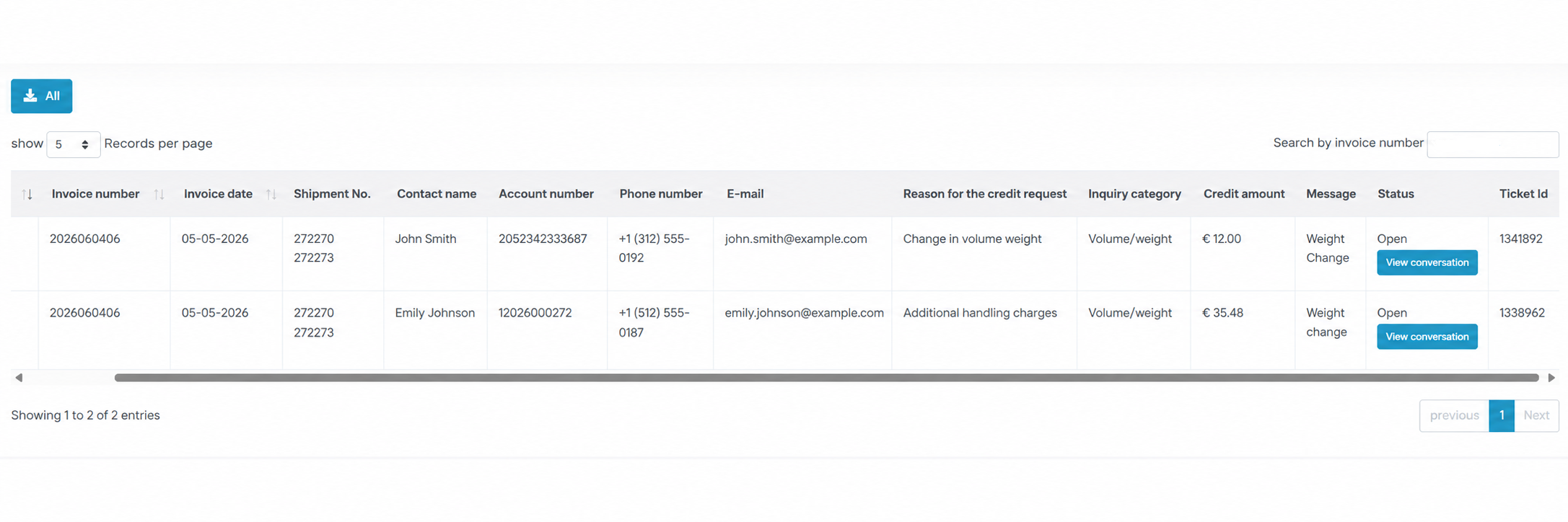
- The dispute dashboard displays all submitted invoice and shipment disputes.
Invoice Details
- Displays invoice-related information including:
- Invoice Number
- Invoice Date
- These references help identify the billing record associated with the dispute.
Shipment No
- Displays the Shipment Number linked to the disputed invoice or charge.
Contact Information
- Displays the contact information associated with the dispute request including:
- Contact Name
- Phone Number
- Email Address
Account Number
- Displays the billing account number associated with the shipment or invoice.
Reason for Credit Request
- Displays the selected reason for the reimbursement or dispute request.
Inquiry Category
- Groups disputes into categories such as:
- Volume / Weight
- Incorrect Charge
- Billing Error
- Shipment Issue
Credit Amount
- Displays the total reimbursement amount requested for the dispute.
Status
- Displays the current investigation or dispute status.
Ticket ID
- Displays the unique support Ticket ID used for dispute tracking and communication.
Step 2: Review dispute conversations
- Click the View Conversation button to review the full communication thread related to a dispute.
- Conversation history may include:
- Support responses
- Investigation updates
- Additional information requests
- Resolution details
Step 3: Export dispute records
- Click the Download All button located at the top-left corner of the page to export your complete dispute history.
- Exported files may be useful for:
- Financial audits
- Internal reporting
- Accounting records
- Claim management
Step 4: Search disputes
- Use the Search by Invoice Number field located at the top-right corner to quickly locate a specific dispute.
- Searching by invoice number helps manage large dispute histories efficiently.
Tips & Tricks
Keep Invoice References Available
- Always keep invoice numbers and shipment references available when reviewing disputes.
Monitor Dispute Statuses Regularly
- Check dispute statuses frequently for updates or additional information requests.
Review Conversation History Before Responding
- Read previous support messages carefully before replying to avoid duplicate communication.
Export Dispute Records Periodically
- Download dispute histories regularly for accounting and reporting purposes.
Provide Accurate Dispute Information
- Accurate dispute amounts and detailed explanations help speed up dispute investigations and reimbursements.
Track Ticket IDs
- Save Ticket IDs for easier communication with support teams and future reference.
This guide is about the customer portal. No account yet? Create one for free.
Still stuck?
Our support team is here for you 24/7.