
Cost center users
The Cost Center Users section allows you to create and manage additional users within your account.
This feature helps teams collaborate on shipment operations while maintaining organized cost center access, financial tracking, and operational control.
Open the Cost center users from the left-side menu or directly at transportal.parcelinternational.com/user/costcenterusers.
Step 1: Add a new user
- To create a new user, click the + Add User button located at the top-right corner of the dashboard.
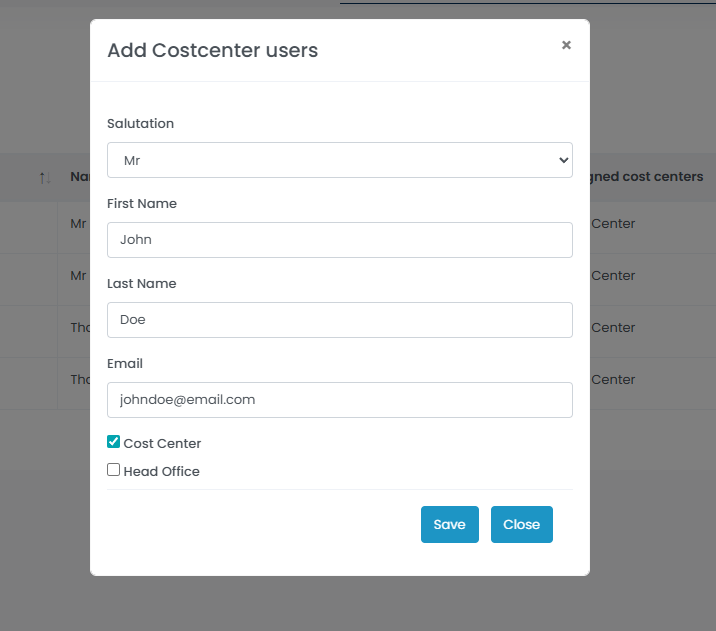
Salutation
- Select the appropriate title for the user from the dropdown list.
- Example values may include:
- Mr.
- Ms.
Name Details
- Enter the user's:
- First Name
- Last Name
Email Address
- Enter the email address the user will use to log in to the platform.
- Ensure the email address is valid and accessible by the user.
Cost Center Assignment
- Select the cost center(s) the user is authorized to access and use during shipment booking.
- All active cost centers associated with your account will be available for selection.
Save the User
- Click the Save button to finalize the new user profile.
- After saving:
- An activation email will be sent to the provided email address.
- The email contains:
- Account activation link
- Login credentials or password setup instructions
Step 2: Manage existing users
- The dashboard provides an overview of all users associated with your cost centers.
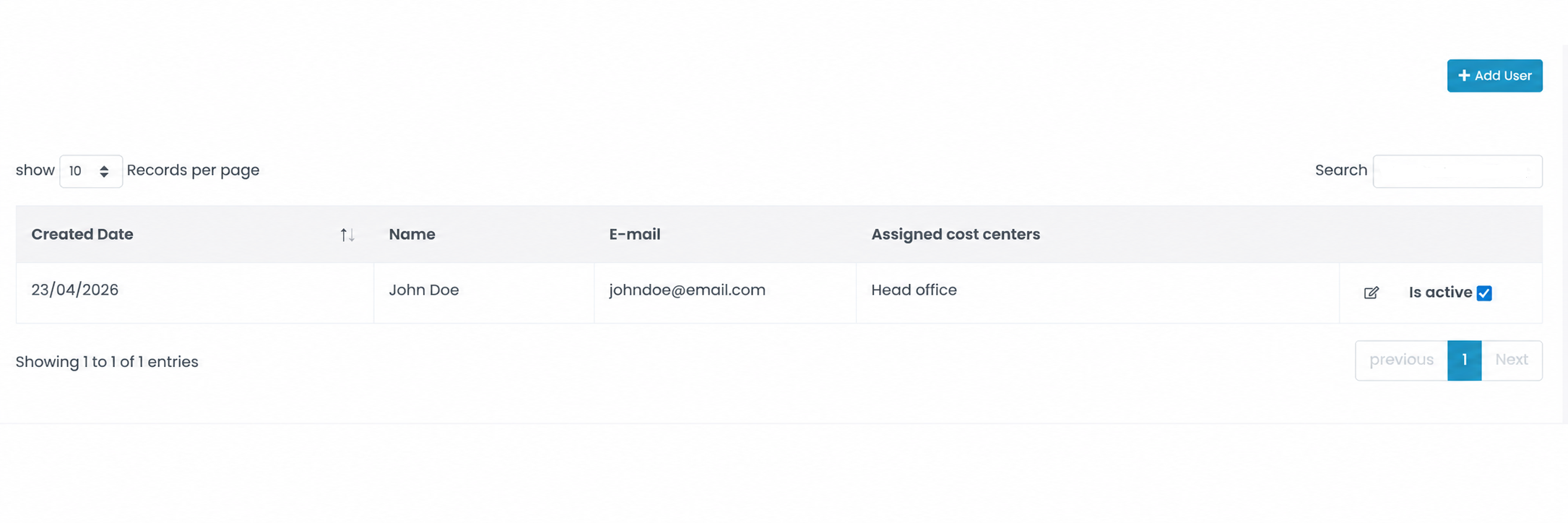
Created Date
- Displays the date when the user account was created.
User Details
- Displays the following user information:
- Full Name
- Email Address
Assigned Cost Centers
- Displays all cost centers the user is authorized to access and use.
Active Status
- Use the Is Active checkbox to enable or disable user access quickly.
- Disabled users will no longer be able to access the platform.
Edit User Information
- Click the blue pencil icon to update:
- User details
- Email address
- Assigned cost centers
Tips & Tricks
Assign Only Required Cost Centers
- Grant users access only to the cost centers relevant to their operational responsibilities.
Keep User Information Updated
- Regularly review user email addresses and assigned departments to maintain accurate account access.
Disable Unused Accounts
- Disable users who no longer require platform access instead of deleting accounts immediately.
Use Department-Based Access
- Organize users by department, warehouse, or operational location using cost center assignments.
Monitor Active Users Regularly
- Periodically review active users and permissions to maintain account security and operational control.
This guide is about the customer portal. No account yet? Create one for free.
Still stuck?
Our support team is here for you 24/7.