
Manifest
The Manifest page allows you to generate shipment manifests that serve as official proof of shipment transfer from the shipper to the carrier.
Shipment manifests are commonly printed at the end of the day and signed by the carrier during shipment collection.
Using shipment manifests helps maintain accurate shipment records and confirms carrier acceptance of the listed shipments.
Open the Manifest from the left-side menu or directly at transportal.parcelinternational.com/shipment/manifest.
Step 1: Configure manifest search filters
- Use the manifest generation form to filter and display shipment records.
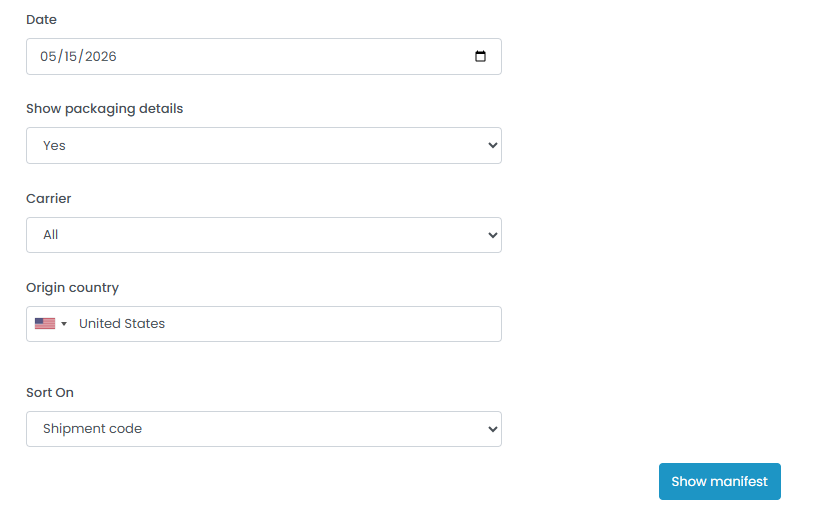
Date
- Select the shipment date used to filter shipment records.
- Only shipments matching the selected date will appear in the manifest results.
Show Packaging Details
- Use the dropdown menu to determine whether packaging details should be included in the manifest.
- Packaging details may include:
- Package dimensions
- Weight information
- Quantity details
Carrier
- Select a specific carrier to filter shipment results.
- Alternatively, select All to include shipments from all active carriers.
Origin Country
- Select the shipment origin country.
- Only shipments matching the selected origin country will be included in the manifest.
Sort On
- Select how shipment results should be organized in the generated manifest.
- Available sorting options may include:
- Shipment Code
- Service Level
- Tracking Number
- Country
Step 2: Generate the shipment manifest
- After completing all required filter fields, click the Show Manifest button.
- The system will generate a shipment manifest containing the filtered shipment records.
Step 3: Print and use the manifest
- Review the generated shipment manifest before printing.
- Shipment manifests are commonly used for:
- Carrier pickup confirmation
- Shipment transfer records
- Operational shipment tracking
- Daily shipment reconciliation
- Carriers may sign the printed manifest to confirm shipment collection and transfer responsibility.
Tips & Tricks
Generate Daily Manifests
- Generate shipment manifests daily to maintain accurate shipment handover records.
Verify Shipment Counts
- Always verify shipment quantities and tracking numbers before printing the manifest.
Use Carrier Filters
- Filter manifests by carrier when preparing separate pickups for different shipping providers.
Include Packaging Details When Needed
- Enable packaging details for shipments requiring package-level verification.
Keep Signed Copies
- Store signed manifests for operational auditing and shipment proof-of-transfer records.
Use Sorting for Easier Handling
- Sort manifests by tracking number or shipment code to simplify shipment scanning and carrier verification processes.
This guide is about the customer portal. No account yet? Create one for free.
Still stuck?
Our support team is here for you 24/7.