
Lost Shipping Form
The Lost Shipment section allows you to report and monitor investigations for shipments that have not arrived as expected.
Submitting complete and accurate information helps speed up the investigation and claim resolution process with the carrier.
Open the Lost Shipping Form page from the left-side menu or directly at transportal.parcelinternational.com/form/lost
Step 1: Review critical submission guidelines
- Before submitting a lost shipment claim, ensure the following requirements are met.
10-Day Reporting Window
- Lost shipment claims should be submitted within 10 days after the expected delivery date.
- Reporting shipment issues early improves the chances of a successful investigation.
Required Documentation
- Attach all required supporting documents when submitting the claim.
- Important documents may include:
- Purchase invoices
- Commercial invoices
Processing Time
- Carrier investigations for lost shipments typically take an average of 30 days.
Notifications
- You will receive updates once the carrier provides an official investigation result or claim outcome.
Step 2: Monitor lost shipment claims
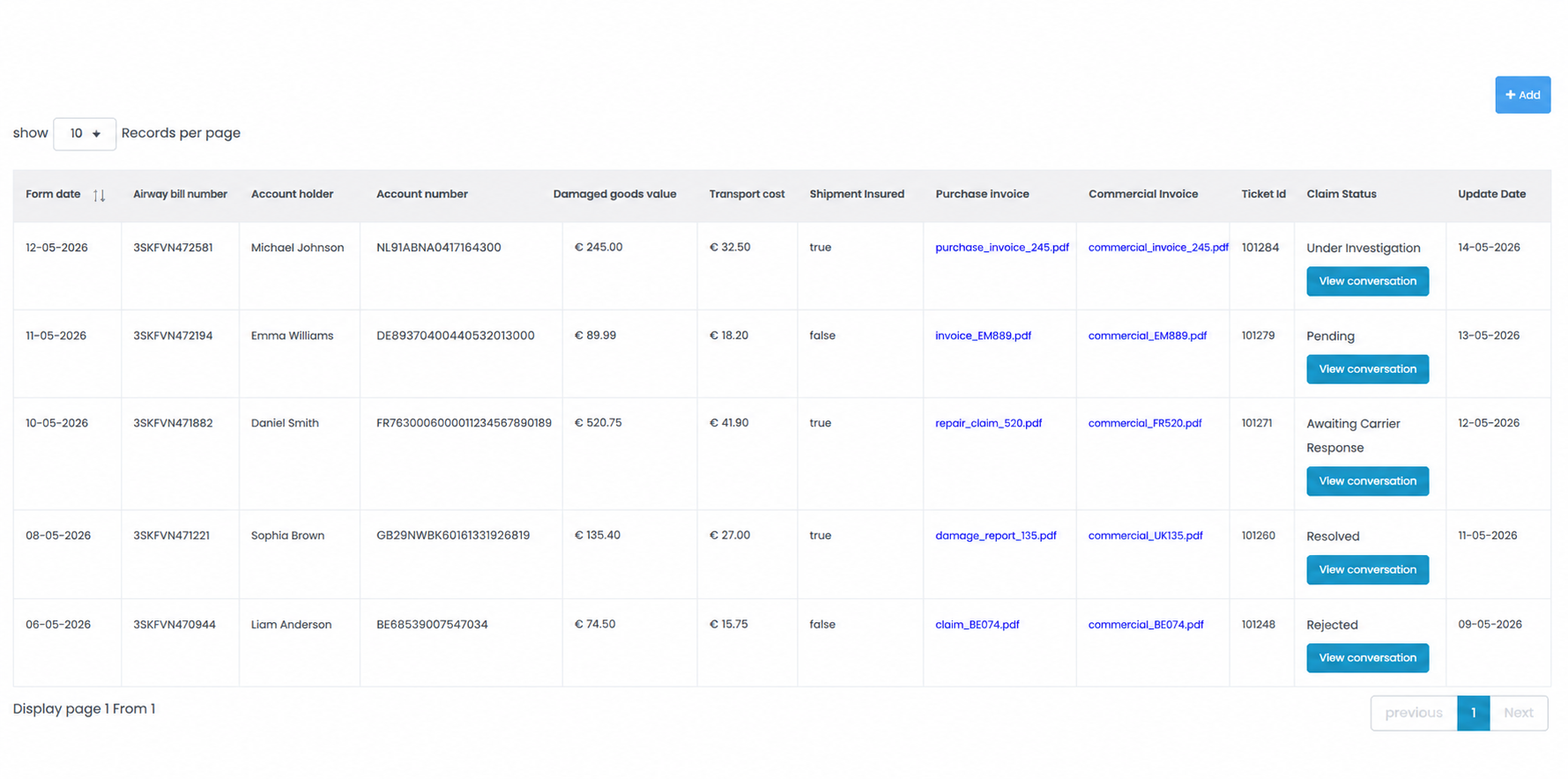
- The Lost Shipment dashboard allows you to manage and monitor all submitted shipment investigations.
Identifiers
- Displays the following shipment investigation references:
- Airway Bill Number
- Ticket ID
Value & Costs
- Displays shipment-related financial information including:
- Damaged goods value
- Transport cost
Insurance Status
- Indicates whether shipment insurance was enabled for the shipment.
- Insurance status may appear as:
- True
- False
Evidence Links
- Provides direct access to uploaded supporting documents such as:
- Purchase Invoice
- Commercial Invoice
Tracking Status
- Displays the current investigation or claim status.
- Also shows the latest update date for the shipment investigation.
Communication History
- Click the View Conversation option under the Claim Status section to review the latest investigation messages and carrier responses.
Step 3: Create a new lost shipment request
- Click the + Add button located at the top-right corner of the page.
- Complete the lost shipment form with accurate shipment information.
- Ensure all shipment details and supporting documents are provided before submitting the request.
Tips & Tricks
- Submit lost shipment claims as soon as possible after identifying the issue.
- Keep purchase invoices and commercial invoices(if available) ready before starting the claim process.
- Ensure shipment references and tracking numbers are entered correctly.
- Upload clear and complete supporting documents to improve claim processing speed.
- Regularly review claim statuses and conversation updates for investigation progress.
- Insured shipments may have faster or more comprehensive claim handling depending on carrier policies.
- Keep copies of all submitted documents for future reference and audit purposes.
This guide is about the customer portal. No account yet? Create one for free.
Still stuck?
Our support team is here for you 24/7.