
Language
The Language option allows you to change the system display language according to your preference.
Selecting a preferred language updates the platform interface and supported text throughout the application.
Step 1: Open the language selector
- Locate the Language option within the platform interface.
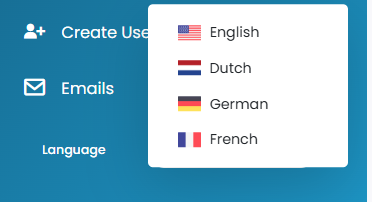
Step 2: Select a preferred language
- Click the dropdown menu displayed next to the Language label.
- Select one of the supported system languages from the available list.
- Once selected, the platform interface will automatically update to the chosen language.
Step 3: Verify language changes
- After selecting a language, review the platform interface to confirm the updated translations and display texts.
- Some pages may require refreshing or reopening to fully apply language updates.
Tips & Tricks
Select Your Preferred Language Carefully
- Choose the language most comfortable for daily shipment operations and communication.
Refresh the Page if Needed
- If some texts do not update immediately, refresh the browser page.
Use Supported Languages Only
- Only languages officially supported by the platform will appear in the dropdown list.
Browser Translation Tools
- If your preferred language is not available, browser translation tools may provide additional assistance.
This guide is about the customer portal. No account yet? Create one for free.
Still stuck?
Our support team is here for you 24/7.