
Damaged Shipping Form
This guide contains essential instructions on how to report damaged shipments to ensure a smooth and efficient claim process.
By submitting the Damaged Shipment form within the required timeframe, you can help speed up the investigation and resolution process.
Open the Damaged Shipping Form page from the left-side menu or directly at transportal.parcelinternational.com/form/damage
Step 1: Review claim submission guidelines
- To avoid claim rejection, please carefully follow the requirements below.
Do Not Move the Goods
- The carrier may need to perform an on-site inspection of the shipment and packaging.
- Do not dispose of the original packaging
- Do not move or alter the damaged goods
- Keep all packaging materials available for inspection
- Failure to follow these steps may result in the claim being rejected.
Submit Within 7 Days
- Claims must be submitted within 7 days after the shipment delivery date.
- Claims submitted after this period will be considered invalid.
Processing Time
- Carriers generally require approximately 30 days to process damaged shipment claims.
Claim Outcome Notification
- You will be contacted directly once the carrier completes the investigation and provides a final decision.
Step 2: Review the Damaged Shipment Dashboard
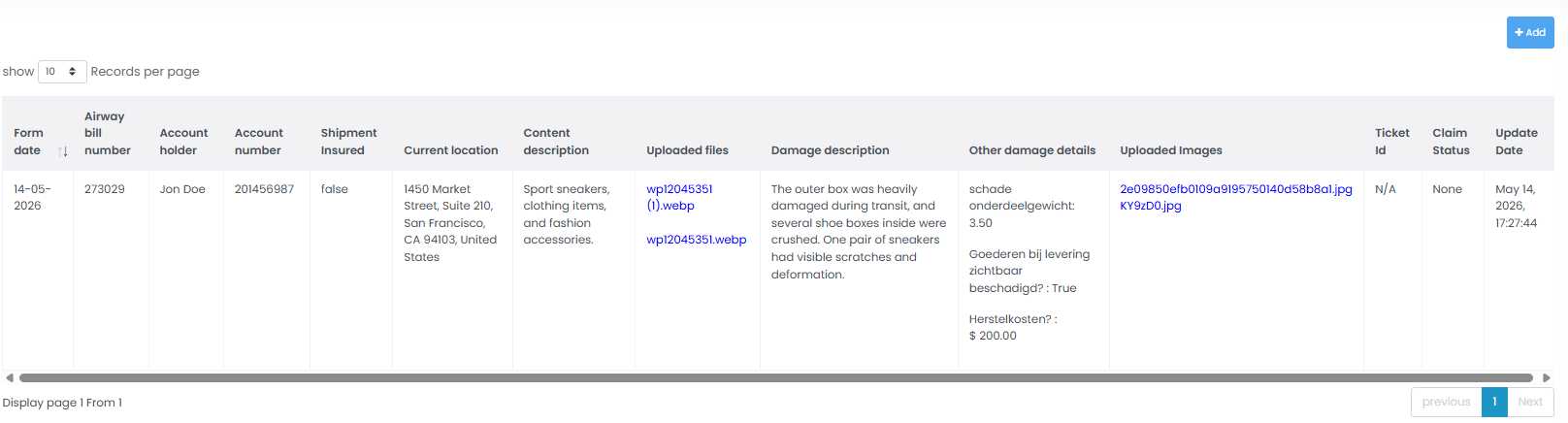
The dashboard provides a complete overview of all reported damaged shipment claims.
Shipment Identifiers
The following identifiers are available for tracking purposes:
- Airway Bill Number
- Internal Ticket ID
Logistics Information
You can view shipment-related details such as:
- Current location of the goods
- Shipment content description
Damage Description
A short summary describing the reported damage.
Additional Damage Details
The dashboard may also contain:
- Technical damage information
- Repair cost details
- Visibility of the damage upon delivery
- Additional inspection notes
Uploaded Images
Direct access to uploaded photographic evidence, including:
- Damaged packaging images
- Damaged item images
Financial & Insurance Information
Displays important financial details including:
- Account Holder Name
- Account Number (IBAN)
- Shipment Insurance Status
Claim Tracking Progress
Monitor the investigation progress using:
- Claim Status
- Last Update Date
Possible statuses may include:
- Pending
- Under Investigation
- Awaiting Carrier Response
- Resolved
- Rejected
Step 3: Submit a New Damaged Shipment Report
Follow the steps below to create a new damage investigation request.
Open the Submission Form
Click the + Add button located at the top-right corner of the dashboard.
Prepare Required Documents
Before submitting the form, ensure you have the following files ready:
Commercial Invoice
Upload the shipment Commercial Invoice, if available and applicable to the shipment.
Commercial invoices may be required for shipment verification and carrier investigation processing, depending on the shipment type and destination (e.g., international shipments).
Damage Evidence Images
Upload clear, high-quality images showing:
- Outer packaging damage
- Inner packaging condition
- Damaged products/items
- Shipping labels (if visible)
Complete the Damage Information
Provide all required details accurately, including:
- Airway Bill Number
- Damage Description
- Repair Cost Information
- Delivery Condition Details
- Insurance Information
Submit the Claim
After verifying all information and attachments, submit the damaged shipment report for investigation.
Tips & Tricks
- Take Photos Immediately
- Capture images as soon as the damage is discovered to provide accurate evidence.
- Use Clear & Bright Images
- Blurry or dark images may delay the investigation process.
- Try to include:
- Multiple angles
- Close-up damage shots
- Full package photos
- Keep Original Packaging
- Always keep:
- Boxes
- Wrapping materials
- Labels
- Internal protection materials until the claim is fully resolved.
- Provide Detailed Descriptions
- A clear and detailed damage explanation helps carriers process claims faster.
- Example:
- "Top-right corner crushed during transport"
- "Glass item broken inside sealed package"
- Double-Check Uploaded Files
- Before submission, verify that:
- All required files are uploaded
- Documents are readable
- Images open correctly
- Monitor Status Regularly
- Check the dashboard periodically for:
- Carrier updates
- Additional information requests
- Final claim decisions
This guide is about the customer portal. No account yet? Create one for free.
Still stuck?
Our support team is here for you 24/7.